Before your next client call, you need to know what changed, what you agreed to do and what still needs an answer. AI client updates can help: compare recent conversations with the existing client record, review the proposed changes, and save only what you approve.
The useful result is a record you can trust when you prepare for the next conversation. A transcript summary alone does not tell you which parts of the old record are now stale.
Start with one record and two sources
For a first trial, use an AI assistant that accepts pasted text or attached documents. You do not need an email connection or an Obsidian setup to try the comparison. Use fictional material first, or documents you are authorized to share with that assistant.
You need the current client record and the recent conversations that might change it. If you keep a separate project plan, include the relevant part so project decisions do not get confused with the overall relationship.
Try the following exercise. Cobalt Ridge is the fictional client used in our companion demonstration. The sample excerpts below are simplified teaching material, not quotations or a reproduction of its exact records.
Current client record
Client: Cobalt Ridge
Relationship: Active client
Project: Workshop preparation
Workshop format: One session
Primary contact: Tom
Backup contact: Not recorded
Workshop date: Unconfirmed
Next action: Review the workshop
outline
Source M1: recent meeting note
The client agreed to split the
workshop into two sessions.
Ana will be the backup contact.
Tuesday was suggested for the
workshop, but the date was not
confirmed.
Source E1: later email
Could we do Thursday instead of
Tuesday?
Please check with Tom and Ana before
updating the workshop date.
The sources support changes to the format and backup contact. They leave the date undecided. Neither source says the relationship ended or the project was cancelled.
Ask for a proposal before anything is saved
Paste the record and both sources with this instruction. The source labels let you check where each proposed change came from.
Compare the current Cobalt Ridge
record with sources M1 and E1.
Return a table with: field, current
value, proposed value,
source, and decision needed.

Keep client relationship status
separate from project details.
Flag conflicts and tentative language.
If a source is missing,
say so; do not treat it as evidence
that nothing changed.

Do not invent a date or commitment. Do
not edit a file or
contact anyone. Wait for my decision.
A useful answer should contain these findings. Exact wording will vary between assistants.
| Field | Current value | Proposed value | Source and decision |
|---|---|---|---|
| Workshop format | One session | Two sessions | M1 records agreement; review and approve |
| Backup contact | Not recorded | Ana | M1 names the backup; review and approve |
| Workshop date | Unconfirmed | Keep unconfirmed | M1 suggests Tuesday; E1 proposes Thursday and requests confirmation |
| Relationship | Active client | No change | Neither source changes the relationship |
If the assistant chooses Thursday as the confirmed date, the proposal fails this exercise. A later suggestion is not an agreement. If it cannot identify M1 or E1, resolve the missing input before accepting its comparison.
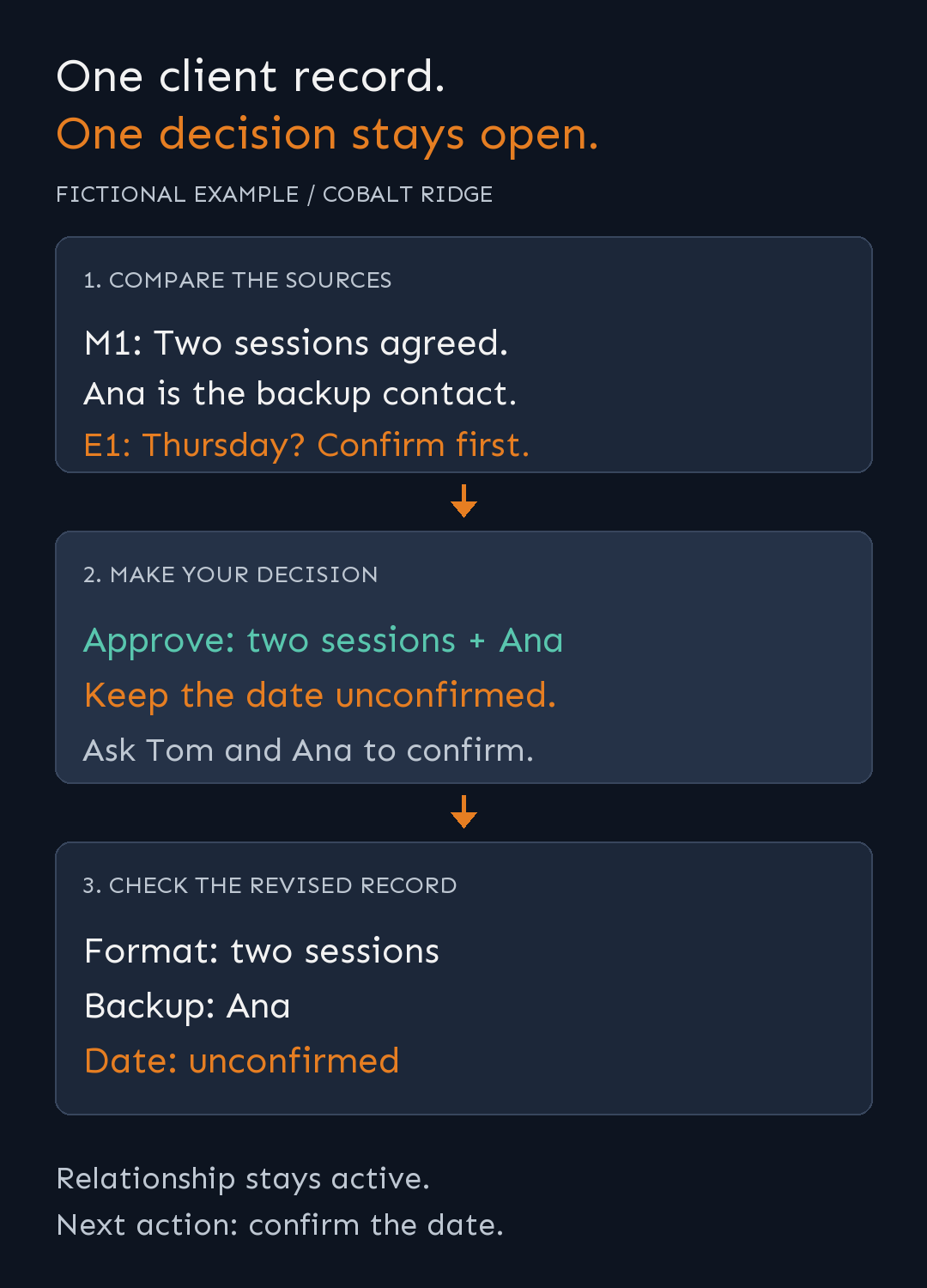
Simplified fictional example. The date stays open while the supported changes move into the record.
Approve the changes and check the result
Review the source excerpts, then give a specific decision:
Approve the format change and add Ana
as the backup contact.
Keep the workshop date unconfirmed.
Set the next action to: Confirm the
workshop date with Tom and Ana.
Show the revised record. Do not write
to any files yet.
Check the assistant's answer against this expected record:
Client: Cobalt Ridge
Relationship: Active client
Project: Workshop preparation
Workshop format: Two sessions
Primary contact: Tom
Backup contact: Ana
Workshop date: Unconfirmed
Next action: Confirm the workshop date
with Tom and Ana
Sources: M1 supports format and
backup; M1/E1 leave the date open
For this pasted-text trial, check the proposed record and copy the approved version into your notes yourself. Keep the source references beside the update so a teammate can check its basis later.
With a connected agent that can edit your records, the same decision can authorize a specific file update. Read the saved file back afterward. Check that it changed the intended fields and preserved unrelated information; the assistant's success message is not the acceptance check.
Make the useful parts repeatable
In the companion video, we ask what changed with Cobalt Ridge and tell the assistant to use a client-management skill. The demonstrated setup reads the maintained records, finds relevant context and proposes changes. We approve the updates except the workshop date.
The organization behind that short request matters. Client notes hold company background and relationship history, meetings link to transcripts, and project plans hold scope and next actions. A skill supplies reusable instructions for finding and updating those records.
The copy-and-paste exercise above lets you try the decision process before building those connections. Once it works for one client, define the records and source locations your own skill should use, what it may change, and how it must handle missing information. An instruction to read email still needs an actual supported connection.
If you want to build that foundation in Obsidian, Your AI Second Brain covers organizing notes, connecting supported AI tools and building reusable skills. You can then adapt those foundations to a client-record workflow like this one. This exercise is a starting point for a client-record workflow; connecting a full CRM requires additional setup.
Frequently Asked Questions
Can I start without connecting my email account?
Yes. Paste or attach the current record and the relevant excerpts. The assistant can compare what you supply; it cannot check an inbox you have not connected.
Should a client record be rewritten after every meeting?
Start with a proposal for the fields that changed. A focused update makes it easier to preserve useful history and check that project changes have not altered the relationship status.
What if the assistant finds no new information?
Ask which sources it reviewed. No relevant changes in the supplied material is a different result from being unable to access the intended sources.