An AI approval workflow makes human approval meaningful when it gives a person enough context to judge a specific action, then keeps that decision attached to the work that actually happens. Show the work, explain the change and its consequences, and carry out the approved version within the agreed scope.
We recently had to remind our AI assistant of that first step:
“you see everything i only see what you show me”
The comment came after our AI assistant asked us to approve a header, a video concept and a plan without showing them. The assistant had the context. We needed it to show us the work before we could decide.
It is an easy problem to recognize once you picture the exchange. An assistant says, "The header is ready. Do you approve?" You are reading that message between meetings. There is no image, no explanation of what changed, and no indication of where it will be used.
Put the work beside the decision
A useful approval request includes the artifact itself: the image, the finished paragraph, the proposed changes or a readable preview of the records being updated. A filename establishes that something exists. Seeing the work lets you judge it.
For a long document, show the changed section and explain what else is affected. Link the complete version for anyone who needs to inspect further. If the choice depends on the whole document, make the whole document accessible before asking.
The same principle applies to plans. "Approve the plan" is hard to answer when the plan lives somewhere else. Put the recommendation, its reason and any meaningful tradeoff in the message asking for the decision.
An AI content approval workflow: say what the yes authorizes
In this fictional nonprofit newsletter workflow, an AI assistant has drafted an email. A weak approval request from the assistant says:
“The newsletter is ready. Can we proceed?”
Proceed could mean revise the writing, save it in the email platform, schedule it or send it. Each action has different consequences.
A clearer request from the assistant would appear immediately below the full newsletter preview:
“This is version 2. I shortened the opening and replaced the general donation request with the volunteer sign-up link because this edition is recruiting event helpers. Approving here means accepting this wording for the draft. Scheduling and sending will be separate decisions.”
That makes the current editorial choice clear. Later, when the team wants to authorize delivery, the request should show the final email again, identify the sending account and intended audience, and state the date, time and time zone. Material audience exclusions and unresolved concerns belong there too.
Teams can authorize several steps together when the complete package is ready to inspect. They can also give standing authority for a defined recurring task. The useful boundary is whatever the person actually agreed to, expressed clearly enough that the assistant can follow it.
AI workflow approval controls: keep approval attached to the version
Showing the work solves only half the problem. The approved work must also be the work the system acts on.
When we audited our time-recording workflow, we found this distinction mattered. Approval existed in conversation, but the posting process did not adequately bind that approval to the exact entries. In a dry run, an edited amount could be treated as another entry instead of being rejected as a change to previously reviewed work.
The reviewed entries had not actually been overposted. The audit identified a gap in how the workflow connected a decision to an action.
We used our AI assistant to implement checks that tie an approval record to a specific batch and its rules, then checked the local test results. A changed batch should be held for review through the appropriate correction path. This is a local implementation result; we have not established that the complete process is proven across every machine and production condition.
The broader lesson applies to a newsletter, a purchase request or an update to a shared contact list: approval of one version should not silently authorize a later version with different consequences.
For a small team, a saved version and a clear action record may be enough to manage this by hand. In an automated workflow, the software needs to compare the proposed action with the approved package before it writes. A content fingerprint can help detect changes, but the system still needs a trustworthy way to establish who had authority to approve. Recording that someone approved is an assertion about a decision; it does not by itself authenticate that person.
Ask whoever builds your workflow to demonstrate what happens when the content changes after approval. The answer should be observable.
Human oversight: give routine work room to move
Nobody needs an assistant that asks permission to take every small step. Anthropic's guidance on building agents describes human checkpoints alongside checks of actual results during execution.
If you asked it to draft a report, it should gather the authorized sources, organize the material and write the draft. If you already approved an unchanged action, it should carry it through. Repeatedly asking the same question creates work without improving the decision.
Set boundaries around consequences. Formatting a local draft is different from changing a shared record. Preparing an email is different from sending it. A recurring update can run within standing authority when its allowed changes, destinations and limits are understood.
The assistant should ask again when a change affects the basis of the earlier decision: a new recipient group, a different amount, a stronger claim, a public destination or a changed commitment. For routine edits within the agreed scope, it should continue working.
Close the loop with the actual result
After taking the authorized action, the assistant should inspect what happened and report it in plain language. For a website update, that means checking the resulting page and its important links. For a record update, it means reading back the changed record. If the tool cannot verify a detail, say which detail remains unverified.
When an action times out, inspect the destination before retrying. The first attempt may have completed even though its response never arrived. A blind retry can create a duplicate. Keep a brief record of what was approved, what happened and what needs attention.
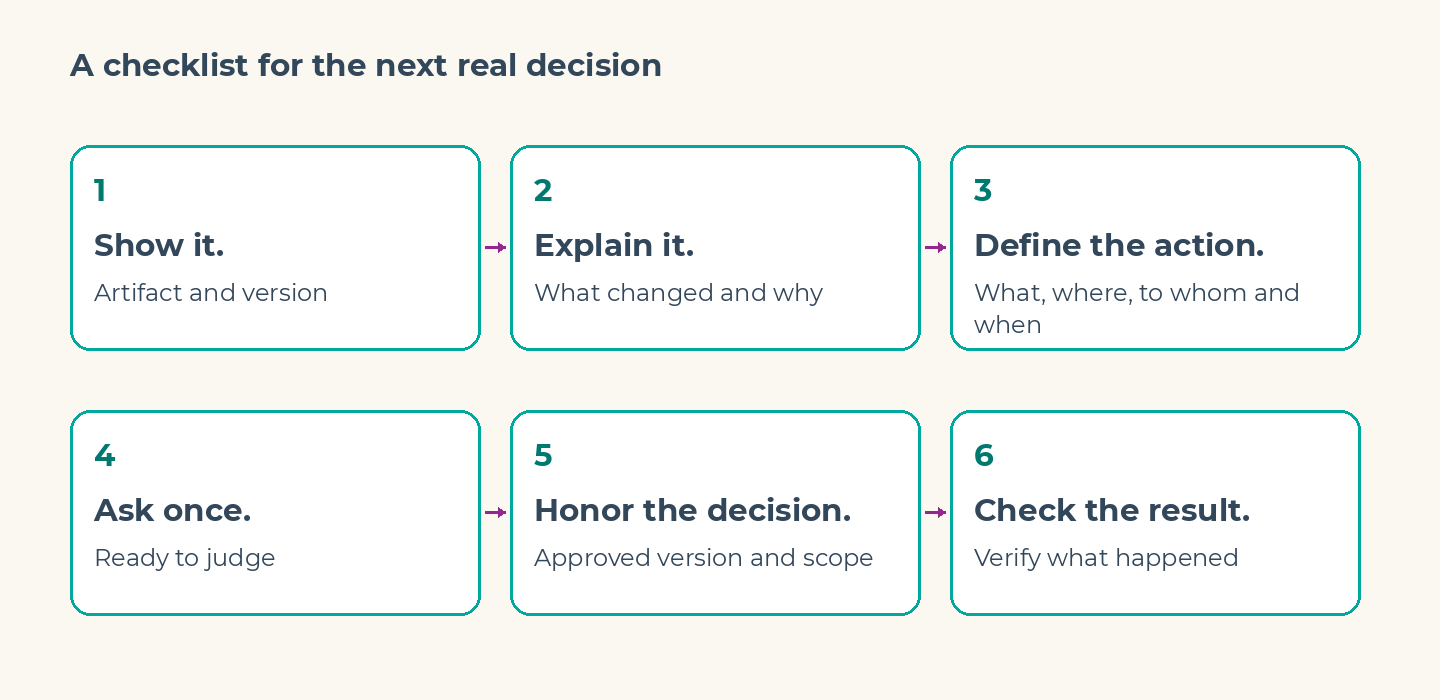
A checklist for the next real decision
Use this checklist to review how your AI assistant handles one workflow your team already uses. Your team sets the boundaries and makes the approval decisions; the assistant should:
- Show it. Put the artifact or relevant changes beside the request, with an identifiable version.
- Explain it. State what changed, why, and any uncertainty that could affect the choice.
- Define the action. Name what will happen, where, to whom and when, as relevant.
- Ask once. Request the decision when the work is ready to judge; continue within authority already given.
- Honor the decision. Apply the approved version and scope. Hold meaningful changes for a renewed decision.
- Check the result. Verify what happened and identify anything that needs follow-up.
Start with the approval request your team finds most frustrating. Put the missing context into that request and see whether the person can make the decision without another round of questions.
A prompt to put in your AI instructions
Copy this into your assistant's system or custom instructions, wherever your tool lets you set ongoing guidance:
Before asking for approval, show the actual artifact or relevant changes and identify the version. Briefly explain what changed and why, the exact action, destination, consequences, and any important uncertainty. Ask only when the decision is ready to review. Carry out the approved version within the authorized scope; do not ask again for unchanged, authorized work. If a material change affects the basis of approval, show the difference and ask again. After acting, verify the result and report the actual outcome, including anything you could not verify.This guides the assistant's behavior. Critical systems still need permission and approval checks in the tools that perform the action.
Try it with a fictional header or newsletter first: can you see the work and tell exactly what your yes allows? Then change the audience after approval and check that the assistant asks again. An unchanged, authorized task should continue.
Frequently Asked Questions
How do you build AI agents with human-in-the-loop approval workflows?
Start by making the relevant work visible so a person can understand the proposed action and decide within their authority. The workflow then needs to apply that decision to the approved version and scope and verify the result.
How do you implement an AI content approval workflow?
Show the draft and identify its version, then state whether approval covers the wording, scheduling or sending. Connect the decision to that version and scope, and verify the result. Let assistants complete routine work within existing authority; reserve new decisions for meaningful consequences, exceptions and changes outside those boundaries.
When should an AI assistant ask for approval again?
The assistant should ask again when a change affects what the person agreed to, such as a different audience, amount, destination or commitment. An unchanged action that is already authorized should continue without repeated requests.
Does an approval button guarantee the right action?
No. The button needs a reviewable proposal behind it, a person with authority to decide, and a workflow that connects the decision to the exact action. The resulting action still needs verification.