When we planned our HubSpot CMS migration, we did not start by comparing platforms. We started with a list of every job our HubSpot website was quietly doing for us, because you cannot replace a platform until you know what it holds up.
Most articles about HubSpot alternatives line up features and prices. That is useful later. The first question is different: which pieces of your website live inside the platform, and which of them can actually come out?
This is the first post in a series about how we moved the Synaptic Labs website and blog off HubSpot to a site we run ourselves. We will walk through the process in order, including the parts that went wrong, so you can borrow what works for your own move. Our CRM move has its own separate series.
Quick glossary for this series
- CMS (content management system): the tool where you write and edit pages and blog posts without touching code. HubSpot includes one; we replaced it with Payload.
- CRM (customer relationship management): the system that keeps track of contacts, conversations and deals.
- HTML, CSS and JavaScript: the three building blocks of a web page. HTML is the content and structure, CSS is the styling, and JavaScript adds behavior like forms and menus.
- API (application programming interface): a doorway one piece of software uses to ask another for data or actions, instead of a person clicking buttons.
- URL: a web address, like www.synapticlabs.ai/blogs.
- Sitemap: a file that lists every page on a site so search engines can find them.
- Backlink: a link to your site from someone else's site. Search engines treat them as votes of confidence.
- Redirect: an instruction that sends anyone visiting an old URL to its new address. A permanent (301) redirect also tells search engines the move is for good.
- DNS (domain name system): the internet's address book. It tells browsers which server answers for your domain.
- SEO (search engine optimization): everything that helps your pages show up in search results.
Start with what the website does for you
Our HubSpot website was more than pages. It hosted our landing pages and blog, ran our forms, embedded meeting booking, and handed every submission straight to the CRM. It also linked out to a newsletter app, our prompt library, our AI readiness assessment and our course platform.
Writing that down changed the question. We were not looking for one product to replace HubSpot. We were looking for a home for each job, and every hidden job became something the new site had to do on purpose.
A few things surprised us when we made the list. Some pages loaded their forms through scripts (small JavaScript programs that run in the browser), so a quick scan of the page code found no form at all even though visitors saw one. Our blog search sent people to a results page that HubSpot powered behind the scenes. Details like these only show up when you go looking for them, and each one becomes something to rebuild.
Choosing among HubSpot CMS alternatives
The biggest decision was separating the website from everything else. The site and blog would get their own content management system, and contacts and follow up would live in a CRM. The website hands each form submission to the CRM, which runs the follow up.
For the website we chose Astro, a framework for building fast websites, for the public site. Behind it sits Payload, an open source CMS where our team writes and edits content, which stores everything in a PostgreSQL database. We had already built a similar site and CMS for one of our own products, so we were adapting working code rather than starting from nothing.
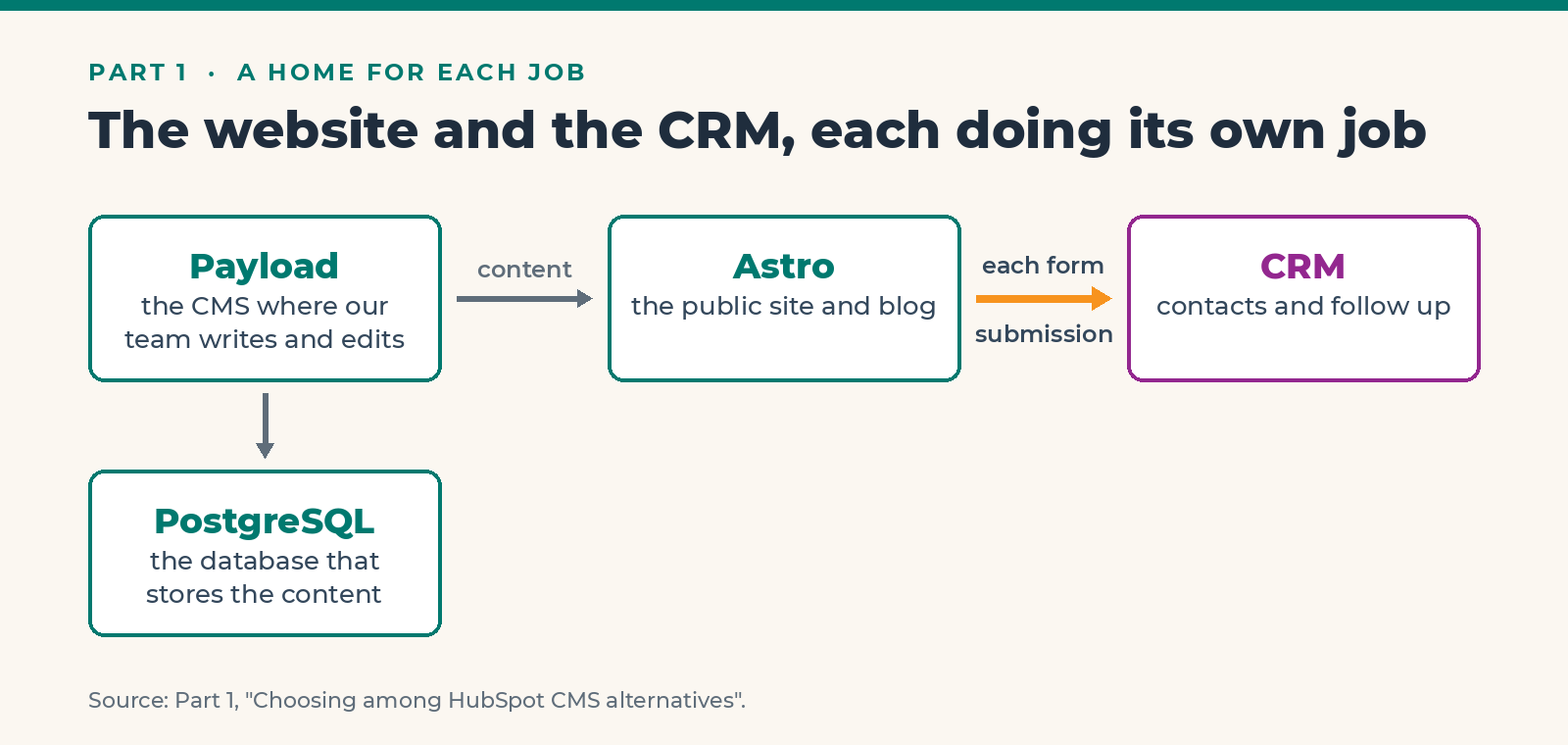
The reason for the split is simple. Editors get a CMS built for publishing, and our content lives in code and a database we control. It also keeps us from slowly turning a website database into a homemade CRM.
The tradeoff is real. Owning the site means we own the upgrades, the backups, the failed integrations and the recovery when a deploy (pushing a new version of the site live) goes wrong. Starting from our own existing code helped, but it did not make that responsibility go away.
Can the website code come out of HubSpot?
This is where every HubSpot migration should start, and the answer is yes, in useful pieces. It is not a portable application you can export and run somewhere else.
HubSpot lets you export website pages, blog posts and templates as HTML, and blog content as structured data. Its command line tools (text commands a developer runs in a terminal) can fetch theme source, and its source code API covers templates, modules, CSS and JavaScript. What none of those give you is HubSpot's forms engine, personalization, page editor or the workflows behind them. Those have to be rebuilt somewhere else.
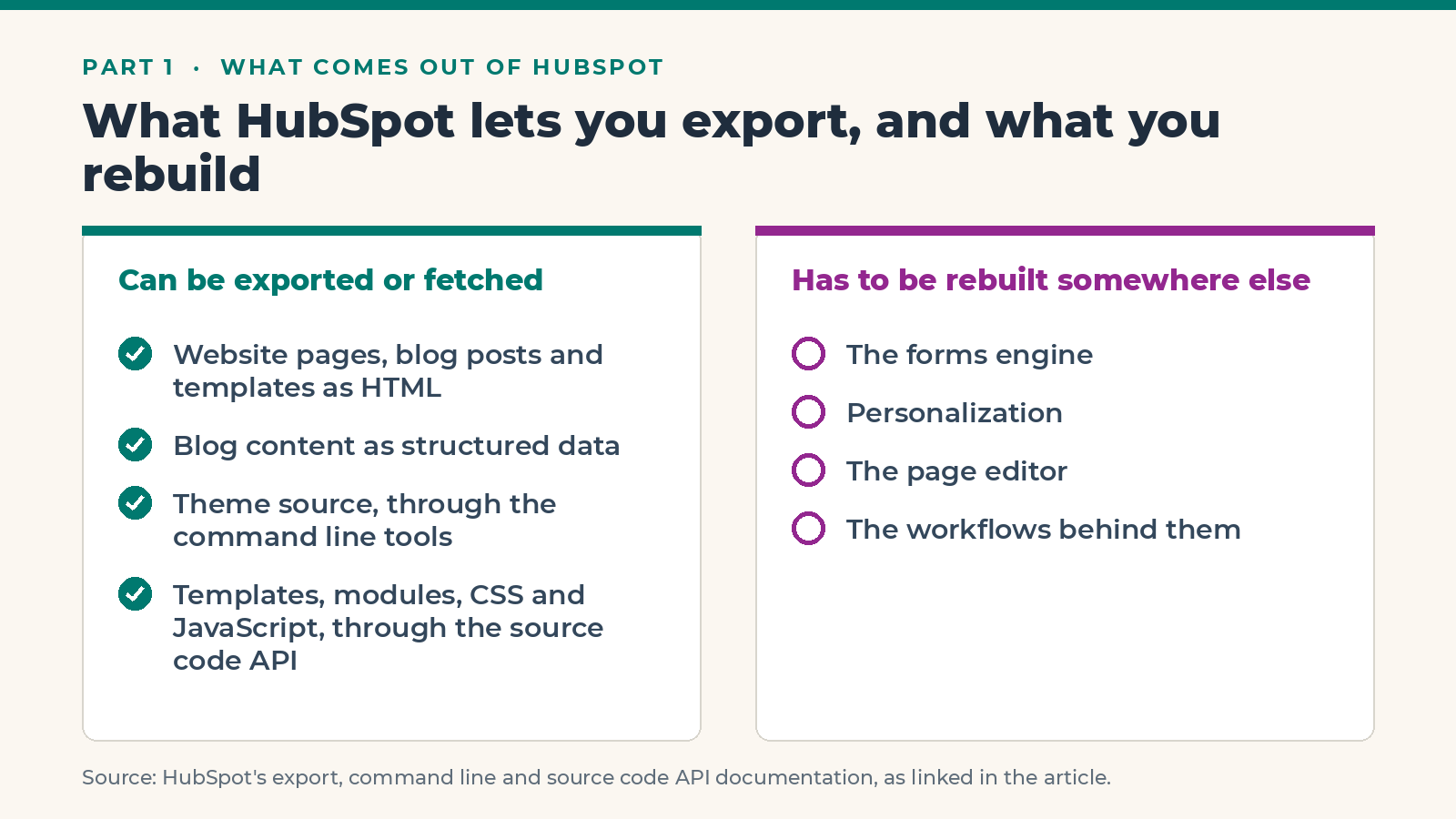
So we planned an extraction set before building anything:
- The rendered HTML of every page and post, kept for side by side comparison.
- Theme, module, CSS and JavaScript source wherever we could reach it.
- Page and blog data, including drafts.
- Every asset, with its original URL.
- Redirects, navigation, forms, consent settings, calls to action and workflows, captured as definitions or screenshots.
In practice we got part of that list. We captured the rendered public site, 177 pages and 407 assets (images, files and styles), each saved with a fingerprint so we could prove nothing changed underneath us. We never got HubSpot's editable theme source working, so the rendered pages became our reference. When a rebuilt page looked or behaved differently, we checked it against the original instead of trusting memory.
Can every blog post move?
Yes, and we strongly recommend an importer over copying posts by hand. Our public sitemap listed 159 URLs on the blog that needed to move.
The rule we set was to import every post under a stable source key, a permanent ID tied to the original post, so running the importer twice updates a post instead of duplicating it. We kept the original HTML in an archive, then cleaned and converted it into the CMS format. Anything the converter could not handle cleanly, like tables, embedded forms or custom modules, went into an exception queue for a person to review.
We also listed what each post had to keep: title, body, URL path, author, original publish date, genuine update date, tags, metadata, image alt text and captions. Images moved to our own storage, and internal links were rewritten to point at them. Drafts stayed private, and we did not guess a public URL or date for anything that had never been published.
What happens to backlinks and search?
This is the part most people worry about, so it got the most care. Changing your CMS or hosting does not break a backlink by itself. What matters is that the old URL still leads somewhere sensible.
Google treats a hosting move that keeps every URL the same differently from a move that changes URLs. If a URL has to change, the guidance is a one to one permanent redirect to the closest equivalent page, updated internal links and sitemaps, and no chains of redirects. Redirects should stay for at least a year, and for important links, indefinitely.
Nobody can promise zero ranking movement in a website migration, even a careful one, and we would be wary of anyone who does. What you can do is inventory every URL before you move, test the new site before switching the domain, and watch traffic closely afterward. We will cover how we did that in the cutover post later in this series.
Where should the new site live?
Most of our other apps already ran on Railway, a cloud hosting service that runs apps and databases for you, so the website, the CMS and its database went there too. That means one place to deploy, read logs and manage settings for everything we run. We also looked at a hosted website builder, which would have been faster to set up but gave us less control over the code and a harder path for our prompt library.
Keeping everything on Railway paid off on cutover day: switching the domain only meant changing a few DNS records at our domain registrar.
For budgeting, we priced each piece from its published plans and treated hosting as an allowance to measure rather than a fixed bill. We also checked what each plan's API access actually allowed before choosing one, instead of upgrading because of a label on a pricing page.
What we would tell someone starting their own move
If you are weighing HubSpot alternatives, here is the short version of what worked for us:
- List every job the platform does before you look at replacements.
- Decide where each job should live. One replacement for everything is rarely the right answer.
- Find out what can actually be exported, and plan to rebuild the rest.
- Treat URLs as assets. Keep them or redirect them one to one.
- Rebuild forms and integrations deliberately, and test every one before the switch.
- Be honest about what you will now own and maintain.
Next in this series: how we inventoried every page, post and asset before building anything, and why that inventory mattered more than any design decision.
If you are planning a move like this and want a second set of eyes on your plan, book a 25 minute call with us. We will help you map what you have and where each piece should go.
Frequently Asked Questions
What software is an alternative to HubSpot's CMS?
It depends on how much control you want. Hosted builders are faster to set up, while a content management system such as Payload paired with a site framework like Astro gives you full control over your code and content. Many small businesses also split the website from the CRM rather than finding one replacement for both.
What do you lose when you leave HubSpot's CMS?
You lose HubSpot's drag and drop page editor, its forms engine, personalization, and the built in link between pages and the CRM. Each of those needs a replacement: editable fields in your new CMS, forms that post to your CRM, and analytics you set up yourself. List them before you start so none of them surprise you after launch.
Can you export a website from HubSpot?
Partly. You can export pages, blog posts and templates as HTML, blog content as structured data, and theme source through HubSpot's command line tools. You cannot export HubSpot's forms engine, personalization or workflows, so those need to be rebuilt on the new platform.
Will moving off HubSpot hurt my SEO?
Changing platforms does not break backlinks by itself, as long as every old URL still resolves or redirects permanently to its closest equivalent. Keep URLs the same where you can, use one to one redirects where you cannot, and monitor traffic after the move. No careful migration can promise zero ranking movement.
How long does it take to move a website off HubSpot?
It depends on the size of the site and how much you rebuild. We finished our research on September 9 and switched our website and blog over on September 27, working with AI coding agents under a review process. Cleaning up afterward and moving smaller tools takes longer than the cutover itself.